

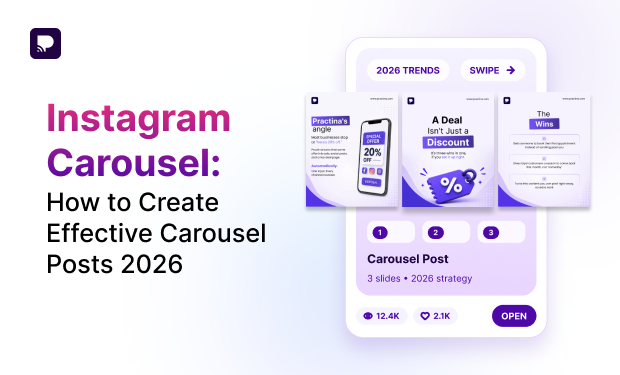
An Instagram carousel gives brands, creators, and marketers more room to communicate than a single-image post. Instead of trying to fit an entire idea into one visual, you can break it into a sequence of images or videos that people can swipe through.
This makes carousel posts useful for tutorials, educational content, product features, step-by-step guides, storytelling, comparisons, customer stories, and more.
But simply adding several images to one Instagram post does not automatically make an effective carousel. The content needs a clear structure, a strong first slide, consistent design, readable copy, and a reason for the viewer to keep swiping.
In this guide, you’ll learn how to create effective Instagram carousel posts, structure your slides, choose the right sizes and aspect ratios, use multiple content types, and measure whether your carousel is working.
What Is an Instagram Carousel?
An Instagram carousel is a post that allows you to share multiple photos or videos within a single Instagram post. Instead of viewing one piece of content, users can swipe through the different slides.
Instagram carousels can be used for both visual storytelling and educational content. For example, a business could use one carousel to explain five product benefits, while a creator could use another to share a step-by-step tutorial.
This format gives marketers an important advantage: more space to develop one idea without creating multiple separate posts.
Why Are Instagram Carousels Effective?
The biggest strength of carousel posts is their ability to create a sequence.
A single image might communicate:
“Here are five ways to improve your Instagram content.”
A carousel can turn that same idea into:
- Slide 1: A strong hook
- Slide 2: Tip #1
- Slide 3: Tip #2
- Slide 4: Tip #3
- Slide 5: Tip #4
- Slide 6: Tip #5
- Slide 7: A summary
- Slide 8: A call to action
This structure gives the audience a reason to continue interacting with the post.
Make Social Media Posting Easier
Create & manage carousel posts with Practina’s all-in-one marketing tools.
Try PractinaHow to Create an Effective Instagram Carousel
Creating strong carousel posts for Instagram users who want to swipe through requires more than good design.
You need to think about the entire experience from the first slide to the final call to action.
Here is a practical process you can follow.
1. Start With One Clear Goal
Before designing your carousel, decide what you want the post to accomplish.
Your goal could be to:
- Educate your audience
- Increase saves
- Generate comments
- Introduce a product
- Explain a process
- Build brand awareness
- Showcase customer results
- Drive traffic
- Generate leads
- Encourage people to follow your account
Do not try to achieve every goal with one carousel.
For example, if your goal is to increase saves, create a carousel that provides information people may want to reference later.
A post such as:
“7 Instagram Caption Formulas You Can Reuse”
has a natural reason to be saved.
If your goal is product education, a better concept could be:
“5 Features That Make Our Platform Easier to Use”
The goal should influence the topic, structure, CTA, and even the design.
2. Choose a Topic That Deserves Multiple Slides
Not every idea needs to become an Instagram carousel.
If your message can be understood instantly from one image, a static post may be better.
Carousel posts work best when the subject naturally requires:
- Multiple steps
- Several examples
- A comparison
- A story
- A list
- A tutorial
- Several product features
- Multiple statistics
- Before-and-after information
- A series of related ideas
A useful test is:
“Would removing the additional slides make this content less useful?”
If the answer is yes, a carousel is probably a good format.
For example:
Weak carousel idea:
“Happy Monday!”
This probably does not need eight slides.
Stronger carousel idea:
“7 Mistakes That Are Hurting Your Instagram Content”
Each mistake can become a separate slide, making the carousel useful and easy to follow.
3. Make the First Slide Your Strongest Slide
Your first slide is one of the most important parts of your Instagram carousel.
It is the first thing people see while scrolling, so it needs to communicate value quickly.
Think of the first slide as the cover and hook.
A weak opening might say:
“Instagram Carousel Tips”
A stronger opening could say:
“7 Instagram Carousel Mistakes That Are Costing You Engagement”
The second version creates curiosity and tells the audience what they will get from swiping.
▪ Effective Carousel Hook Formulas
You can use several approaches for your first slide.
▪ Number-based hook
“7 Instagram Carousel Ideas to Try This Month”
▪ Problem-based hook
“Your Instagram Carousels Aren’t Getting Saves? Here’s Why.”
▪ Curiosity-based hook
“Most Brands Make This Carousel Mistake.”
▪ Educational hook
“How to Create an Instagram Carousel From Scratch”
▪ Benefit-based hook
“Turn One Blog Post Into an Instagram Carousel.”
The important thing is that the viewer should understand the value of the post without having to read the caption first.
4. Build a Logical Slide-by-Slide Structure
A good carousel should feel like one piece of content rather than a collection of unrelated graphics.
A simple structure is:
Slide 1: Hook
Tell people what they will learn or discover.
Slide 2: Context
Explain why the topic matters.
Slides 3–7: Main Content
Deliver the core information one idea at a time.
Slide 8: Summary
Bring the key points together.
Slide 9: CTA
Tell the viewer what to do next.
You do not have to use exactly nine slides every time. The number should depend on the subject.
For example, a simple tutorial might need six slides, while a detailed educational guide could use 10 or more.
The key principle is:
Every slide should have a job.
If a slide does not add information, move the story forward, provide an example, or strengthen the message, consider removing it.
5. Keep One Main Idea on Each Slide
One of the most common mistakes in carousel posts is trying to put too much information on one slide.
Imagine a slide that contains:
- Three paragraphs
- Five statistics
- Four icons
- A product screenshot
- A headline
- A CTA
The information may be valuable, but the slide becomes difficult to understand.
Instead, break the information apart.
For example:
5 Ways to Improve Your Instagram Strategy
Slide 1:
Start With a Clear Content Goal
Slide 2:
Create Stronger Hooks
Slide 3:
Make Your Content Easier to Save
Slide 4:
Use Consistent Visuals
Slide 5:
Review Your Performance
This makes the information easier to scan and understand.
6. Use Design Consistency Across Your Instagram Carousels
Your carousel should look like one connected visual experience.
That means keeping important design elements consistent, including:
- Fonts
- Colors
- Spacing
- Image treatment
- Heading styles
- Icon styles
- Brand elements
- Alignment
- Visual hierarchy
Consistency does not mean every slide has to look identical.
Instead, create a recognizable design system.
For example, your first slide might use a large headline and a strong image, while the content slides use smaller headings, illustrations, and supporting text.
The visual style can change while still feeling like part of the same carousel.
7. Make Your Copy Easy to Scan
Instagram is a fast-moving platform.
People are usually not reading your carousel like a 2,000-word article.
They are scanning.
Therefore, avoid placing large paragraphs on every slide.
Instead:
- Keep sentences short.
- Use clear headings.
- Highlight important words.
- Use bullet points when appropriate.
- Break complex ideas into multiple slides.
- Leave enough empty space around text.
- Use a readable font size.
For example, instead of:
“There are several different ways businesses can improve their Instagram strategy, but one of the most important things to consider is creating content that provides real value to your target audience.”
Use:
- Create Content People Need
- Give your audience something useful.
- Teach them something.
- Help them solve a problem.
- That is much easier to consume on a carousel.
8. Use Storytelling to Encourage Swipes
One of the biggest advantages of Instagram carousels is that they can tell a story.
Instead of presenting disconnected facts, create a sequence where every slide naturally leads to the next.
For example:
Slide 1:
“We spent months trying to fix our content strategy.”
Slide 2:
“Here was the problem.”
Slide 3:
“We were creating content without a clear goal.”
Slide 4:
“So we changed our approach.”
Slide 5:
“Here are the three things we changed.”
Slide 6:
“Here’s what happened next.”
This structure creates an information gap.
The viewer has a reason to swipe because they want to know what happens next.
Storytelling works especially well for:
- Customer stories
- Case studies
- Brand journeys
- Product launches
- Before-and-after posts
- Behind-the-scenes content
- Lessons learned
- Founder stories
9. Turn Educational Content Into Carousel Posts
Educational content is one of the strongest use cases for an Instagram carousel.
If your brand already creates:
- Blog posts
- Guides
- Research reports
- Webinars
- Podcasts
- Videos
- Tutorials
- Case studies
you can repurpose that information into carousel posts.
For example, a 1,500-word blog post titled:
“How to Improve Your Social Media Strategy”
could become:
Slide 1:
5 Ways to Improve Your Social Media Strategy
Slide 2:
Define Your Audience
Slide 3:
Choose the Right Content Formats
Slide 4:
Create Consistent Content
Slide 5:
Use Data to Improve Your Strategy
Slide 6:
Test Different Ideas
Slide 7:
Save This Checklist
Use carousels to turn longer content such as blog posts, infographics, and customer reviews into more digestible Instagram content.
This makes carousels particularly useful as part of a broader content repurposing strategy.
10. Add Examples Instead of Only Giving Advice
People understand concepts faster when you show them what the advice looks like.
For example, instead of creating a slide that says:
“Use stronger hooks.”
Create a comparison:
Weak Hook:
“Instagram Marketing Tips”
Better Hook:
“7 Instagram Mistakes That Are Hurting Your Reach”
This approach makes your carousel more practical.
You can use:
- Before-and-after examples
- Good vs. bad examples
- Screenshots
- Mini case studies
- Templates
- Checklists
- Examples from your own experience
The more actionable the content is, the more useful the carousel becomes.
Which Instagram Carousel Size Should You Use?
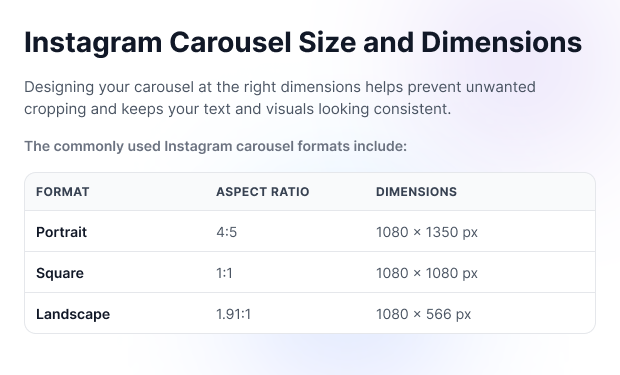
For most educational and text-led carousel designs, 1080 × 1350 pixels (4:5) remains a practical choice because the portrait format gives you more vertical space in the feed than a square post.
Square posts can still be useful when:
- Your design is highly visual.
- You want a classic grid appearance.
- Your existing templates are square.
- Your content needs equal width and height.
Landscape can work when the image itself requires a wide composition, but it generally provides less vertical presence in the mobile feed.
Create Better Carousels With Practina
Plan, create, and publish engaging social content with ease.
Try PractinaHow to Measure Instagram Carousel Performance
Creating a carousel is only half the job. You also need to understand how people respond to it. Depending on the objective of your post, pay attention to metrics such as:
▪ Reach
How many accounts saw your carousel?
▪ Impressions
How many total times was the content displayed?
▪ Likes
How many people reacted positively to the post?
▪ Comments
Did the carousel start a conversation?
▪ Shares
Did people send the carousel to others?
▪ Saves
Did people find the information valuable enough to return to later?
▪ Profile Visits
Did the carousel encourage people to explore your account?
▪ Website Actions
If your goal is traffic or conversions, track link clicks and downstream actions where available.
Do not judge every carousel by likes alone.
For example, an educational carousel may receive fewer likes but generate significantly more saves and shares.
If the objective was to create useful reference content, those actions may be more meaningful than the number of likes.
How to Improve Your Carousel Strategy Using Data Once you have published several carousels, look for patterns. Ask: Which hooks received the most attention? Which topics generated the most saves? Which posts received the most shares? Which slide structures performed best? Did educational content outperform promotional content? Did shorter or longer carousels perform better? Which CTAs generated more comments? Which visual styles consistently performed well? Use your own account data as the primary guide. For example, if your last 10 educational carousels generated significantly more saves than promotional carousels, that is a useful signal for your future content strategy. |
How Practina Can Help With Instagram Carousels
Creating effective Instagram carousels takes more than designing a few slides. You also need a steady flow of ideas, consistent brand messaging, engaging copy, and a reliable publishing process. This is where Practina can help.
Practina is designed to manage different parts of the customer journey, including content creation, social media, advertising, reputation, and customer engagement. Its AI Content Studio can help businesses create social posts, Reels, ads, and blogs from a central workspace.
For businesses that regularly create Instagram carousels, Practina can support the content workflow by helping you:
- Create content faster: Use AI to generate social content from a subject or prompt instead of starting every post from scratch.
- Keep your brand voice consistent: Practina’s Brand DNA learns your brand identity, tone, vocabulary, visual style, and other guidelines so generated content stays aligned with your business.
- Plan your social content: Practina can create and schedule content for channels such as Instagram, Facebook, Google, and TikTok.
- Repurpose content: Turn ideas and longer-form content into different formats so one topic can support multiple pieces of social content.
- Manage content in one place: Keep your content creation and broader marketing activities connected instead of managing every channel separately.
Conclusion
An effective Instagram carousel is more than a collection of images.
It is a structured piece of content designed to take someone from attention to interest to action.
Start with a strong hook. Give every slide a clear purpose. Keep your design consistent, make your copy easy to scan, use examples where possible, and finish with a relevant CTA.
Most importantly, create carousels because the format makes your idea better—not simply because Instagram allows multiple slides.
When you combine useful information, strong storytelling, thoughtful design, and performance data, carousel posts that Instagram users want to save and share become much easier to create consistently.
The best strategy is simple:
- Give people a reason to stop.
- Give them a reason to swipe.
- Give them something worth saving.
FAQs
Q: What is an Instagram carousel?
A: An Instagram carousel is a multimedia post that lets users swipe through multiple photos or videos within one Instagram post. It can be used for educational content, storytelling, product showcases, tutorials, comparisons, and other multi-step content.
Q: How many slides can an Instagram carousel have?
Instagram currently supports up to 20 photos or videos in one carousel post.
Q: What is the best Instagram carousel size?
A: A commonly used format is 1080 × 1350 pixels at a 4:5 aspect ratio. Square and landscape formats are also used. Current 2026 reporting also indicates support for taller 3:4 content, so check the current Instagram upload interface when setting your production standard.
Q: Can you create an Instagram carousel with multiple aspect ratios?
A: Instagram’s carousel formatting has evolved, and current reports indicate that some accounts may have access to a Mixed option that allows different slide ratios. However, availability can vary. For professionally designed carousel posts, using one consistent aspect ratio across all slides provides more predictable results.
Q: How many slides should an Instagram carousel have?
A: There is no universal number. Use as many slides as the idea requires, but avoid adding filler. Educational carousels often work well when each slide delivers one clear takeaway.
Q: What should the first slide of a carousel contain?
A: The first slide should contain a strong hook that clearly communicates why someone should swipe. Use a specific benefit, problem, question, number, or curiosity-driven statement.
Q: Are carousel posts good for educational content?
A: Yes. Educational content is one of the strongest uses for carousel posts because complex information can be broken into smaller, easier-to-understand sections.
Q: Should every slide have the same design?
A: The slides do not need to be identical, but they should share a consistent visual system. Use the same core fonts, colors, spacing, and branding so the carousel feels connected.
Q: What should the last slide of an Instagram carousel say?
A: The final slide should provide a clear next step. Depending on your goal, you can ask users to save, share, comment, follow, visit your website, or learn more.