


According to the McKinsey report, with social media automation tools, marketing teams can boost engagement by 20–30% and reduce content creation time by nearly a third.
Over the years, social media has evolved at full tilt. And so have the demands on marketers. Most marketing professionals don’t have the time to stay active online all day while handling other responsibilities. That’s why automation has become essential for staying consistent and efficient. As a result, tasks like creating content, posting, scheduling, and tracking performance no longer need constant manual effort. Undoubtedly, there are many platforms to automate your social media. Moreover, they offer great results. But when you start choosing one, you often find them complex or not suitable for your needs.
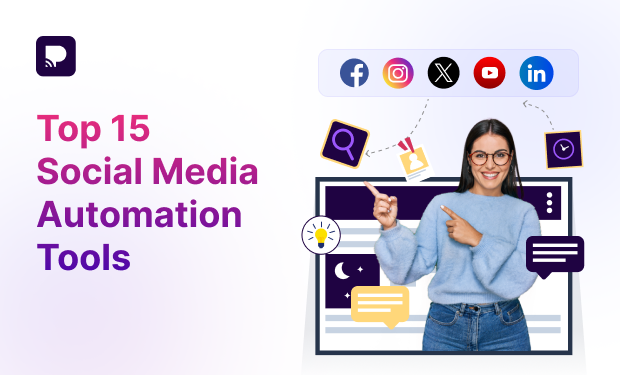
That’s why this guide simplifies things for you. We’ve listed the top 15 social media automation tools for 2026. It focuses on what truly matters so you can make the right choice.
Ready to scale your social media without the hassle?
Let Practina Handle your Social Media, Content, and Growth in one Place.
Get Started Now!What are Social Media Automation Tools
These are platforms that make it easier for individuals and businesses to manage their social media. Whether it’s an app or software, they take care of the heavy lifting. Instead of manually posting, replying, and tracking performance every day, these tools automate repetitive tasks and let you manage multiple accounts from one place.
They’re becoming more popular because they offer useful insights. For instance, the best time to post and what’s working. This means your content goes live when your audience is most active, helping you save time and boost engagement effortlessly.
Best Social Media Automation Tools for 2026
Here is the list of tools to automate your social media, with their pros and cons.
1. Hootsuite
Hootsuite is one of the OG players in the social media automation market. What makes it a staple among social media automation tools is its scalability and control. You can manage everything from content creation in its integrated composer (complete with a handy Canva integration) to moderating comments in a unified inbox.
| Pros Analytics & reporting – Tracks performance, engagement, and gives insights to improve your content Integrations & extra tools – Works with tools like Canva and offers AI features for content creation | Cons No free plan – Earlier, it had one, but now only paid plans are available Complex interface – The dashboard can feel cluttered and confusing for beginners |
2. Practina
Practina is your own ‘Complete Marketing Operating System’. It brings everything you need for marketing into one platform—AI content creation, ad management, reputation management, and lead tracking.
However, it goes beyond just scheduling posts. This social media automation tool actively helps you plan and run campaigns, with features like automatic review replies, AI-generated visuals, and real-time lead capture. Therefore, instead of being just a social media tool, it works like a complete marketing system.
| Pros Ad automation & optimization – Creates and manages ads across platforms with performance feedback Reputation management – AI responds to reviews and curates positive feedback for social sharing | Cons Can be overwhelming for beginners – Being a feature-rich platform, users may require time to learn and configure AI-generated content may need refinement – Gives you a solid starting point, helping speed up content creation while still allowing you to customize and maintain your brand voice |
3. Buffer
Buffer keeps social media management simple with its clean, easy-to-use dashboard. That’s why it’s a great fit for creators and small businesses. With its queue system, you can plan posts in advance, and Buffer will publish them at the right time. No daily effort needed. Its AI assistant helps you come up with ideas, write captions, and refine your content.
You can also create a link-in-bio page to share all your important links in one place. Plus, simple reports and UTM tracking make it easy to measure performance and see what’s working.
| Pros AI assistance – Includes tools to help generate captions and content ideas quickly Analytics – Provides insights to track post performance, engagement, and growth | Cons Limited automation – Doesn’t offer very advanced automation compared to some competitors Fewer collaboration tools – Not as strong for large teams or complex workflows |
4. Sendible
Sendible is a complete tool for managing social media tasks easily. With content queues, your posting stays consistent without extra effort. It also lets you add clients or team members, assign roles, and manage approvals seamlessly.
More than that, this platform provides useful analytics, showing traffic sources, best posting times, and top posts, along with easy-to-share reports. Best suited for agencies, marketers, and brand managers, you can handle social media for clients or businesses.
| Pros Advanced scheduling – Allows bulk scheduling and content queues to maintain consistency Client management – Ideal for agencies handling multiple clients with separate dashboards | Cons Higher pricing – More expensive compared to basic social media tools Learning curve – Takes time to fully understand and use all features effectively |
5. Mention
When you decide to automate your social media, social listening plays a key role. It helps you understand what people are saying about your brand. And that matters. Mention makes this easy. It tracks conversations around your brand, so you never miss what’s being said. It also helps you keep an eye on competitors and stay updated on industry trends, making your decisions smarter and more strategic.
This tool has 3 features that set it apart from others – First, instant notifications, so you never miss important mentions. Second, team collaboration features allow multiple users to work together efficiently. Third, integrations like Slack and Zapier.
| Pros Brand monitoring – The real-time analysis of industry trends and the feature of quick responses make it unique Keyword analysis – Users can easily check for keywords and trending mentions | Cons Limited AI usage – Most users say that the use of AI is limited and complex Inaccuracy – There can be minor errors in the case of fr sentiment analysis |
6. Sprout Social
This platform enables users to schedule up to 350 posts through bulk uploads. Moreover, it provides suggestions for the best times to post. In addition, its Smart Inbox brings together all social media conversations, allowing teams to reply, assign messages, and automate responses from one place. Likewise, its advanced reporting tools help you analyze performance, track growth, and create customized reports with visual insights.
This social media automation is highly preferred by mid-sized and enterprise businesses that want to measure ROI and make informed, data-driven marketing decisions.
| Pros Easy-to-use dashboard – Clean and user-friendly interface, even with many features Smart inbox – View and reply to all messages from different platforms in one dashboard | Cons Expensive – Starts around $199–$249/month per user, which is high for small businesses Overkill for beginners – Too many features if you only need basic scheduling |
7. Zoho Social
This platform connects your social media tools with other business apps, helping everything work together smoothly. It not only manages your social media efficiently but also integrates with Zoho CRM and Zoho Desk. For example, it can automatically capture leads from social interactions and sync them directly to your CRM.
It also offers strong collaboration features, making it easy to assign roles and set up approval workflows. Plus, with advanced analytics and custom reports, you get clear insights into performance and can easily showcase results.
| Pros Affordable pricing – More budget-friendly compared to many competitors Great integration with the Zoho ecosystem – Works smoothly with Zoho CRM and other tools for better workflow | Cons Limited advanced features – Some advanced tools are missing or only available in higher plans Performance issues at times – Occasional lag or slow system performance |
8. Drum Up
What sets DrumUp apart is its smart algorithms that discover relevant, trending content across the web.
Moreover, the tool includes a content library where you can store and reuse your best-performing posts. It includes RSS feed integration to automatically share blog updates. Along with that, it provides hashtag suggestions and a URL shortener to track link clicks.
| Pros Great for content discovery – DrumUp automatically finds relevant and trending content based on your keywords, saving hours of manual research Content curation + scheduling in one place – You can discover, schedule, and publish posts from a single dashboard | Cons Limited platform integrations – Supports fewer social platforms compared to competitors Content quality can be repetitive – Being a social media automation tool, it suggests articles may sometimes feel repetitive or less relevant |
9. RedactAI
If you want to create great content for LinkedIn, RedactAI is your go-to choice. It builds a customized AI model based on your profile and previous posts to make a consistent brand voice. Furthermore, this social media automation tool generates drafts in just one click. Meanwhile, the platform also helps refine your posts by suggesting improvements. Because of these features, RedactAI is especially useful for CEOs, consultants, and marketers who want to grow their personal brand.
| Pros Customizable writing style – Users can create their own writing style or choose one from the templates provided Multiple variations – There are 3 post variations to choose from | Cons Only AI-generated posts – You can only schedule posts that are generated by AI Basic interface – The dashboard or the interface seems to be standard |
10. Later
With Later, you can easily organize your posts using a drag-and-drop content calendar. It makes the content management more efficient with its media library feature. You can store, organize, and reuse images, videos, and captions through this feature. One specific feature of Later is link-in-bio (Linkin.bio). It allows you to turn your Instagram profile into a clickable landing page.
| Pros Media library & organization – Easily store, tag, and reuse images and videos Link-in-bio feature – Helps drive traffic from social media to your website or products | Cons Less advanced automation – This social media automation tool is not ideal for complex workflows or large teams Platform limitations – Some features don’t work equally well across all social platforms |
11. AgoraPulse
If you are new to growing a social media presence, then this platform helps you set the stage. Agorapulse is designed for freelancers, agencies, small businesses, and enterprises that want to manage all aspects of their social media in one place while improving efficiency and results. Despite helping with scheduling across multiple platforms, it includes newer networks like Bluesky, helping brands stay ahead as social media continues to evolve.
With features like Inbox Assistant and canned responses, you can save time by automating replies to common questions.
| Pros Powerful social inbox – Brings all comments, messages, and mentions into one inbox, saving time Team collaboration features – Allows assigning tasks, approvals, and managing workflows smoothly | Cons Analytics not always deep enough – Some users feel reporting could be more detailed Occasional bugs or glitches – Users report technical issues at times |
12. Loomly
Loomly offers strong social publishing features that let you schedule posts in advance. It can also auto-generate content from RSS feeds to keep your content calendar active.
It provides step-by-step guidance for creating both organic and promoted posts. This helps you stay consistent across platforms. The platform also keeps your team in sync by sending notifications via email, Slack, push notifications, or Microsoft Teams whenever there are updates, edits, or comments on content.
| Pros Easy to use- Loomly has a clean and user-friendly interface, making it simple for beginners and teams to manage content Strong collaboration features- Includes approval workflows, team roles, and notifications for smooth teamwork | Cons Limited analytics – Reporting is not as advanced as premium tools No strong social listening – Lacks deep monitoring of brand mentions or trends |
13. MeetEdgar
At the core of the platform is its category-based content library. You can organize your posts into categories like blog posts, quotes, or promotions. Its social media automation can schedule each category. Once a post is published, it doesn’t disappear. It instead goes back into the queue and is reposted later. As a result, your social media profiles stay consistently active without requiring daily effort.
| Pros Evergreen content automation – Automatically recycles posts, so you don’t have to keep creating new content constantly AI caption assistant (Inky) – Helps generate captions and hashtags quickly | Cons Average collaboration features – Not ideal for large teams or agencies Higher pricing vs competitors – Can feel expensive for what it offers |
14. ContentStudio
ContentStudio combines AI-powered features with essential social media management tools. For instance, it can generate captions and even suggest images. You can also use its Chrome extension to quickly share content from anywhere. On top of that, its Discover feature helps you find trending and high-performing content, which you can analyze and share across your social channels to stay relevant.
| Pros Excellent content discovery – One of its strongest features—helps find trending topics and curate content easily Great for teams & agencies – Workspaces, approvals, white-label reports, and collaboration tools | Cons Interface can feel cluttered – Planner/dashboard has too many options for some users Content quality varies – Discovery tool may require filtering to find good content |
15. Zapier
This social media automation tool creates “Zaps,” which are simple workflows that automatically trigger actions between apps. Take, for example, when something happens in one app (like receiving a new lead or posting content), Zapier can automatically perform a related action in another app, saving time and effort.
| Pros Massive app integrations – Connects 5,000–7,000+ apps—one of the largest ecosystems No-code & beginner-friendly – Easy to set up simple workflows without technical skills | Cons Not ideal for complex workflows – Advanced logic, multi-step flows, or conditions can be restrictive Dependent on third-party apps – If integrations break or APIs change, workflows can fail |
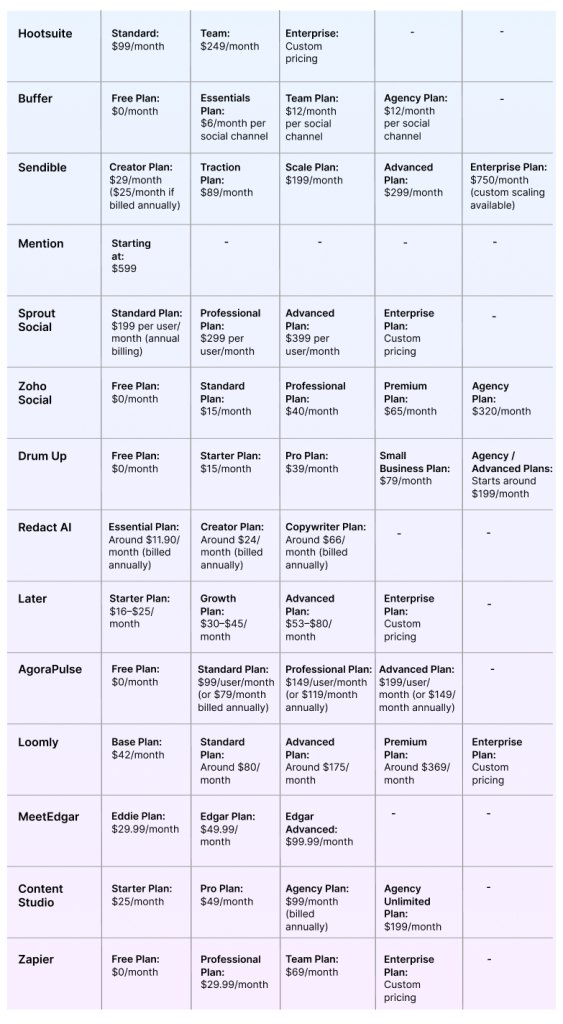
Pricing Plans of Popular Social Media Tools
Conclusion
We’ve explored a wide range of social media automation tools, from powerful enterprise platforms to simple, creator-friendly solutions. One thing is clear. Automation is not a one-size-fits-all approach. The right tool depends on your goals, team size, and workflow. Whether you’re an agency, a solo entrepreneur, or a business professional, choosing the right platform can streamline posting, improve response times, and strengthen overall customer engagement.
FAQs
Q: What Can You Automate With Social Media Automation Tools?
A: You can automate post scheduling, content publishing, and responses to messages or comments. Many tools also handle analytics, reporting, and even lead capture. Therefore, saving time and maintaining consistency across platforms.
Q: How To Select the Best Social Media Automation Tool?
A: Focus on features, usability, and integrations with your existing tools. Check if it supports your platforms, offers automation capabilities, and provides useful insights. A good tool should simplify your process, not complicate it.
Q: What Is the Difference Between Social Media Automation and Social Media Management?
A: Automation handles routine tasks using tools, while social media management involves planning, creating, and optimizing content. Management is the overall process, and automation helps streamline it for better efficiency.