Customers today expect convenience at every stage of their buying experience, and payment is no exception. Whether they’re buying a product, paying for a service or settling up after an appointment, they want the process to be quick, straightforward and flexible.
For businesses, meeting these expectations starts with the right payment setup. A reliable payment terminal makes it easier to accept transactions, accommodate different payment preferences and keep checkout running smoothly.
However, not every terminal offers the same capabilities. Processing fees, supported payment methods, connectivity, security and integration options vary significantly between providers.
Choosing the right one means understanding what your business needs today and what will continue to serve it as it grows. Let’s look at the key considerations.
Choose the Right Terminal. Simplify Payments.
Explore Practina’s payment solutions and find the right fit for your business.
Explore Practina PayWhy Choosing the Right Payment Terminal Matters
A payment terminal is part of your customer’s final interaction with your business. A slow checkout, limited payment options or an unreliable device can leave a poor last impression, even when the rest of the experience went well.
The right terminal helps your team process transactions efficiently while giving customers convenient ways to pay. It also makes payment management easier, with quick access to transaction records and useful business information.
The decision matters beyond the checkout counter, too. Processing fees affect your margins, settlement timelines influence cash flow, and the features included with your terminal determine how much value you get from your payment setup. In short, the right payment terminal should support the way your business already operates, not add another process for your team to manage.
What Is a Payment Terminal?
A payment terminal is a physical device that lets businesses accept electronic payments in person. Also known as a card terminal or POS terminal, it securely captures payment information and communicates with the payment processor to authorize a transaction.
Depending on the device, customers can pay using credit and debit cards, contactless payments, digital wallets or QR codes.
Payment terminals are common in retail stores, restaurants, healthcare practices, salons and other businesses that accept in-person payments.
How Does a Payment Terminal Work?
A payment terminal connects to a payment processor to authorize and complete transactions. Here’s what typically happens:
- Enter the transaction amount: Your staff enters the amount due or pulls it from the connected checkout system.
- Customer chooses a payment method: The customer taps, inserts or swipes their card, or uses another supported payment option.
- Payment information is transmitted: The terminal securely sends the transaction details to the payment processor.
- The transaction is authorized: The processor communicates with the customer’s bank or card network to approve or decline the payment.
- Payment is confirmed: The terminal displays the result and can generate a receipt.
Once approved, the funds are settled according to the provider’s payout schedule.
Types of Payment Terminals
Payment terminals come in different formats, each suited to particular business environments and checkout needs.
- Countertop terminals: Stationary devices for fixed checkout counters, common in retail stores, clinics and other businesses with a dedicated payment area.
- Wireless terminals: Portable devices that connect through Wi-Fi or cellular networks, so staff can accept payments away from the counter.
- Mobile card readers: Compact devices that connect to smartphones or tablets, useful for small businesses, mobile services and payments on the go.
- Virtual terminals: Browser-based tools for processing card payments manually without a physical reader, generally used when the cardholder isn’t present.
- Smart payment terminals: Modern devices that combine payment acceptance with extra capabilities, such as payment plans, financing options, customer engagement tools, digital receipts and business management features.
The right type depends on where you accept payments, how your team works and the experience you want to offer customers.
How to Choose the Right Payment Terminal for Your Business
Comparing payment terminals can get confusing when providers offer different pricing structures, hardware options and feature sets. Rather than choosing on appearance or price alone, evaluate each option against your business requirements. Here are eight factors to consider.
1. Payment Methods Your Customers Prefer
Start with how your customers pay. Some prefer credit or debit cards, while others rely on contactless payments, digital wallets or QR codes. Customers making larger purchases may also want to spread the cost over time.
A terminal that supports only a few payment methods can slow down checkout or cost you the sale. This matters even more if you serve customers with varied preferences or handle a high volume of daily transactions.
Look for a payment terminal that supports:
- Credit and debit cards
- Contactless payments
- Digital wallets
- QR code payments
- Payment plans and financing options for larger purchases
- Other relevant local or alternative payment methods
The goal is to give customers convenient ways to pay without your team juggling multiple devices.
2. Transaction Fees and Pricing Structure
Processing fees directly affect how much your business keeps from each sale. However, the lowest advertised rate doesn’t always mean the lowest overall cost.
Fees can vary by transaction type, payment method, card network and processing arrangement. Some providers also charge for hardware, monthly subscriptions, setup or additional services.
Before choosing a terminal, understand:
- The processing fee for each transaction type
- Any monthly or annual subscription charges
- Hardware purchase, rental or maintenance costs
- Additional fees for refunds, chargebacks or other services
- Whether fees vary by payment method
Ask the provider for a complete cost breakdown. You should be able to estimate what accepting payments will actually cost at your current transaction volume.
3. Connectivity and Reliability
A payment terminal needs a dependable connection to process transactions. Interruptions slow down checkout, create longer queues and leave staff unsure whether a payment went through.
Consider where and how the device will be used. A fixed checkout counter may work well with a wired or Wi-Fi terminal, while a business that takes payments across rooms or service areas may need a portable option.
Check the following before deciding:
- Does the device support Wi-Fi, Ethernet or cellular connectivity?
- Is the connection stable in your business environment?
- Does the terminal have a backup connectivity option?
- What happens if the connection drops mid-transaction?
- Does the provider offer support when technical issues arise?
Also confirm whether the terminal supports offline payments if that matters to your business. Not every device offers it, and offline transactions may carry extra conditions or risks.
4. Security and Payment Compliance
Payment security should be a priority with any payment terminal. Your terminal handles sensitive transaction information, so it needs to meet the security requirements that apply to your payment environment.
Look for providers that clearly explain their security measures, encryption practices and compliance standards. For card payments, ask whether the solution supports the relevant PCI DSS requirements and EMV chip technology.
You should also understand how transaction data is stored, who can access payment records and how the provider handles suspicious activity or disputes.
Don’t rely on broad claims like “fully secure.” Ask for specifics on the protections in place and which responsibilities stay with your business.
5. Ease of Use and Staff Training
Your team may process dozens or hundreds of transactions a day. If the terminal is hard to navigate, even routine payments take longer than they should.
Look for a device with a clear interface and simple transaction steps. Consider whether new employees can learn it without extensive training.
If several employees handle payments, check whether the provider offers user permissions or staff access controls. These let business owners manage who can process transactions, issue refunds or view sensitive information.
A terminal should make everyday checkout easier for your staff, not add extra steps.
6. Integration With Your Existing Systems
Your payment terminal should fit into your existing workflow. If it runs separately from your other systems, your team may have to enter information twice or switch between platforms to manage transactions.
Depending on your business, useful integrations may include:
- Point-of-sale software
- Inventory management systems
- Customer relationship management platforms
- Accounting and bookkeeping software
- Appointment scheduling or practice management systems
Ask providers which integrations they support and whether these need extra setup or subscriptions.
If your current business software works well, check whether the payment solution can complement it. Replacing existing systems just to introduce a new terminal can create more work than value.
7. Reporting and Transaction Visibility
Processing payments is only one part of managing business finances. You also need to know what’s been collected, which transactions are pending and how your payment activity changes over time.
Look for reporting features that let you:
- Review completed and declined transactions
- Track refunds and payment adjustments
- View transaction history
- Monitor sales across relevant periods
- Export records for accounting and reconciliation
If you have multiple employees or locations, check whether reports can be filtered by staff member, device or location.
Clear reporting reduces manual reconciliation and gives you better visibility into the money coming into your business.
8. Scalability and Additional Features
Your payment needs will change as your business grows. You may add locations, expand your team, handle higher transaction volumes or introduce new services.
A terminal that works for a small operation today may not keep up later. Check whether the provider can accommodate higher volumes, additional devices and changing business needs.
It’s also worth looking beyond payment processing. Some modern terminals let you offer payment plans and financing options, and include customer engagement features such as review requests, rewards and referrals. These connect a completed transaction to the next stage of the customer relationship.
Choose features that solve a real business need. A longer feature list isn’t better if your team will never use most of it.
Payment Terminal vs. POS System: What’s the Difference?
A payment terminal and a point-of-sale (POS) system are related, but they serve different purposes. A payment terminal is built to accept and process electronic payments. A POS system manages a wider range of sales activities, which may include inventory, product catalogs, customer records, employee management and reporting.
| Payment Terminal | POS System |
| Accepts and processes payments | Manages broader sales operations |
| Handles card and supported digital payments | May include payment processing as one feature |
| Records transaction details | Tracks sales, inventory and customer information |
| Tracks sales, inventory and customer information | Usually combines hardware and software |
Some modern payment terminals go well beyond basic payment processing. However, they aren’t automatically a replacement for a full POS system.
If you mainly need to accept in-person payments, a payment terminal may be enough. If you also need inventory, sales and employee management, a POS system may suit you better.
How Much Does a Payment Terminal Cost?
The cost of a payment terminal depends on the hardware, payment processor, pricing model and features included.
Some providers sell terminals outright, others rent them, some include the hardware in a service package, and some offer it free. Beyond the device itself, account for ongoing processing fees and any additional charges. Your total cost may include:
- Hardware costs: The purchase or rental price of the terminal.
- Processing fees: Charges on each transaction, which may vary by payment method and card type.
- Monthly fees: Subscription or service charges, where applicable.
- Feature costs: Charges for reporting, integrations or customer engagement tools.
- Maintenance and support: Costs for repairs, replacements or technical assistance.
When comparing providers, calculate the expected cost using your average transaction value and monthly sales volume. This gives a far more realistic picture than comparing advertised processing rates.
Also ask about contract terms, cancellation policies and any charges for switching providers.
Which Businesses Should Use a Payment Terminal?
Any business that accepts in-person payments can benefit from a payment terminal. The right device and features depend on the nature of its transactions.
- Retail stores: Need fast checkout and support for card and contactless payments.
- Restaurants and cafés: Benefit from portable terminals that let staff take payment at the table or counter.
- Healthcare and dental practices: Need a simple way to collect payment at the front desk after appointments, and the option to offer payment plans or financing for larger treatment costs, so cost doesn’t stop customers from going ahead.
- Salons, spas and med spas: Process payments for individual services, packages and retail products, and benefit from tools that bring customers back for repeat visits.
- Professional service businesses: Need flexible payment setups for in-person consultations and higher-value transactions.
- Mobile and field service businesses: Need portable devices to accept payments wherever the work happens.
The key is to match the terminal to your payment environment, transaction patterns and customer expectations.
Make Every Transaction Easier
Discover payment solutions that support your business needs.
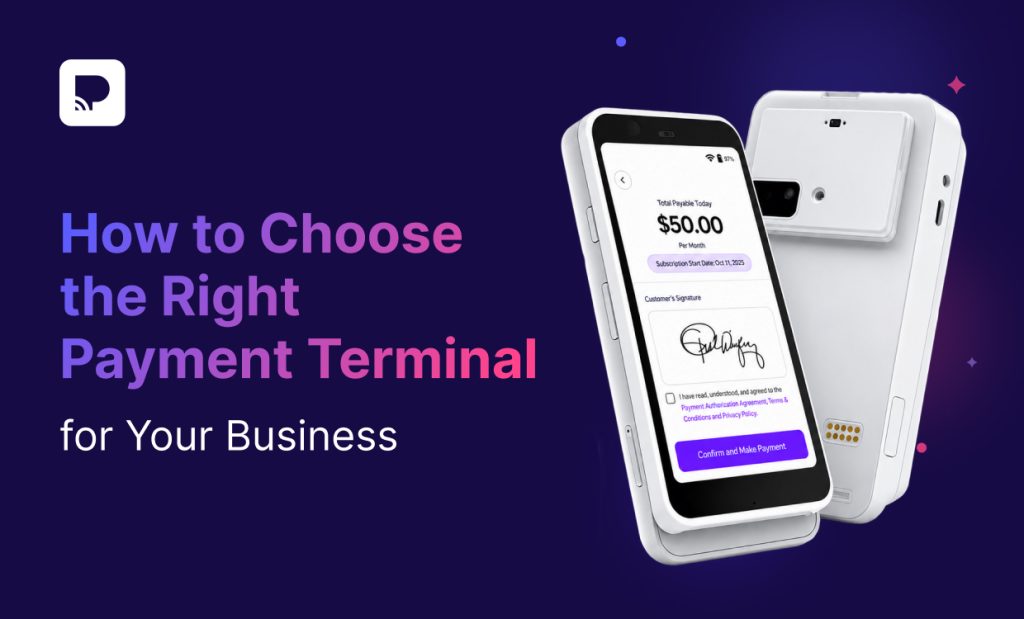
Explore Practina PayPractina Terminal: Every Way to Pay, Right at Your Counter
Practina Terminal brings Practina Pay’s flexible payment pathways to your front desk, so price never ends the sale. And the terminal itself is free.
Flexible payment pathways
- Pay in Full: Customers pay by tap, chip, swipe or QR code, using any of the 50+ supported payment methods. Pay-in-full sales come with Instant Payouts.
- Payment Plans: Customers spread the cost over structured monthly payments.
- Partial Financing: Eligible customers finance part of the cost. You get the approved amount upfront, and a payment plan covers the rest.
- Full Financing: Eligible customers finance the full amount and pay over time, while you get paid upfront.
If a customer falls behind on a payment plan, the account moves to Recuvery, which follows up with polite, on-brand reminders to help them settle the balance.
It doesn’t end with the payment
- Collect reviews: Right after checkout, invite customers to share feedback while the experience is still fresh.
- Reward loyalty: Customers can join your rewards program before they leave, with no extra forms.
- Drive referrals: With a quick tap or scan, customers can follow your business or share it with friends by text, email or QR code.
Managed from Practina
Check whether the device is online, update the rewards customers see at checkout, set your payment and fee-offset preferences, and monitor transactions, all from Practina. Processing is PCI-compliant and encrypted, and the terminal connects over Wi-Fi and sets up in minutes.
One free terminal for every payment pathway, plus reviews, rewards and referrals.
Questions to Ask Before Buying a Payment Terminal
Before committing to a provider, use these questions to compare your options:
- Which payment methods does the terminal support?
- Can customers choose payment plans or financing for larger purchases?
- What are the processing fees and additional charges?
- Is the hardware purchased, rented or included in a service plan?
- What connectivity options are available?
- Does the terminal meet relevant payment security standards?
- Can it integrate with the software we already use?
- What transaction reports and records can we access?
- Can we add more devices or users as the business grows?
- What customer support is available if the device stops working?
- Are there contract terms, cancellation fees or hardware replacement costs?
Clear answers upfront help you avoid unexpected costs and choose a solution that fits your business well beyond the initial setup.
Conclusion: Choose a Payment Terminal That Does More for Your Business
The right payment terminal makes paying easier for your customers and payment management simpler for your team. But choosing one involves more than comparing hardware prices or processing fees.
Consider the payment methods your customers prefer, your transaction volume, connectivity, security, integrations and the features that support your wider business.
If you want every payment pathway and customer engagement in one place, the free Practina Terminal lets you offer pay in full, payment plans and financing at your counter, then turn each payment into reviews, repeat visits and referrals.
FAQs
Q: What is the difference between a payment terminal and a card reader?
A: A card reader captures card information for payment processing. A payment terminal typically offers a more complete checkout experience, including transaction entry, payment authorization, receipts and support for multiple payment methods. Exact capabilities depend on the device.
Q: Can a payment terminal accept contactless payments?
A: Yes. Most modern payment terminals support contactless transactions, so customers can tap compatible credit cards, debit cards or digital wallets. Check the device specifications to confirm which contactless methods are supported.
Q: Do I need a POS system to use a payment terminal?
A: No. Many payment terminals work on their own without a full POS system. However, businesses that need inventory management, sales tracking or employee management may benefit from using a POS system alongside their terminal.
Q: What should I look for in a payment terminal for a small business?
A: Small businesses should prioritize transparent pricing, reliable connectivity, commonly used payment methods, ease of use and responsive support. A portable device is also useful if payments happen outside a fixed checkout area.
Q: Can customers pay in installments with a payment terminal?
A: It depends on the terminal. Some, like Practina Terminal, let businesses offer payment plans, and financing for eligible customers, at checkout, so customers can spread the cost of larger purchases instead of paying everything upfront.
Q: Are wireless payment terminals reliable?
A: Yes, when they have a stable Wi-Fi or cellular connection. Performance depends on network quality, device specifications and your business environment. Check the connectivity requirements and backup options before buying.
Q: How long does it take to set up a payment terminal?
A: Setup time varies by provider and device. Some terminals are ready in minutes, while others need account verification, network setup, software updates or pairing with another system. Ask the provider what’s involved before ordering.
Q: Can I use one payment terminal for multiple employees?
A: Many payment solutions support multiple users, though the controls vary. Some let businesses assign individual accounts and permissions, so employees can process transactions without accessing every management feature.
Q: What is the best payment terminal for my business?
A: The best payment terminal depends on your transaction volume, preferred payment methods, business environment, budget and software needs. Compare providers on these factors rather than on hardware price or processing fees alone.