




Creating a great YouTube video takes time, effort, and creativity. But many creators overlook one important detail: when the video goes live. Posting at the wrong moment can limit views, engagement, and reach, even if the content is of high quality. That’s why understanding the best times to post on YouTube is so important, especially for beginners trying to grow their channel.
YouTube does not show new videos to everyone at once. Instead, it tests them with a small group of viewers first. If people click, watch, and interact early, the platform pushes the video to more users. In this guide, you’ll learn how timing affects performance, how audience habits change during the week, and how choosing the best days to post on YouTube can help your videos reach more people without extra effort.
Getting the Timing Right: Why It Matters More Than You Think
Timing plays a bigger role on YouTube than most beginners realize. When a video is uploaded, YouTube doesn’t instantly show it to thousands of people. Instead, it starts small. The platform watches how viewers react in the early stage, who clicks, how long they watch, and whether they interact. These early signals help YouTube decide if the video is worth showing to more people.
▪ How Timing Affects Visibility and Early Engagement
If a video is posted when most of your audience is offline, it may struggle to get views in the first few hours. Fewer clicks and shorter watch time can make the video look less interesting to YouTube’s system. On the other hand, uploading when viewers are active increases the chances of early engagement, which helps the video appear in recommendations, home feeds, and suggested videos.
Early engagement doesn’t just bring quick views, but it can influence how long a video continues to get traffic days or even weeks later.
▪ How YouTube Pushes New Videos to Viewers
When you click the “publish” button on YouTube, your video does not immediately reach a large audience. Instead, YouTube follows a step-by-step process to decide who should see it and how far it should be promoted.
▪ What Happens Right After You Click “Publish”
As soon as your video goes live, YouTube checks basic details like the title, description, thumbnail, and topic. Then it shows the video to a small group of viewers who are likely to be interested based on their past behavior. This group may include your subscribers or people who watch similar content.
YouTube watches how these viewers respond. Their actions help the platform understand whether the video is useful, interesting, or worth sharing with more people.
▪ The Early Testing Phase
Think of this phase as a trial run. YouTube is testing your video to see how well it performs with a limited audience. During this time, the platform looks at signals such as:
- Do people click on the video?
- How long do they watch?
- Do they like, comment, or share?
If the response is positive, YouTube slowly expands its audience. If the response is weak, the video may stop getting recommended, even if the content is good.
Choosing the best times to post videos on YouTube
Posting time plays a major role in how a new video performs, especially during its first few hours. YouTube does not instantly show a video to a large audience. Instead, it tests the video with a small group of viewers. Uploading at the right time increases the chances that these early viewers are active, engaged, and ready to watch.
Understanding Peak Viewing Windows
Across many channels and content types, viewer activity tends to rise during midday and evening hours. These periods are often considered peak times because more people are available to watch, interact, and stay on the platform longer.
Monday
Peak viewing usually happens later in the day as people ease into the week.
Peak time: 2 PM – 6 PM
Uploading earlier helps your video be ready when engagement starts to rise.
Tuesday
Engagement is steady but competitive. Viewers become more active as the day progresses.
Peak time: 12 PM – 8 PM
Early afternoon uploads perform better than late-night publishing.
Wednesday
Midweek behavior is balanced, with strong engagement later in the day.
Peak time: 3 PM – 7 PM
Videos posted before this window often see more consistent reach.
Thursday
One of the strongest weekdays for engagement as viewers shift toward weekend mode.
Peak time: 12 PM – 5 PM
This window allows videos to build momentum before evening viewing.
Friday
Viewer activity stays high for longer periods compared to other weekdays.
Peak time: 12 PM – 9 PM
Uploading earlier can help capture both afternoon and evening audiences.
Saturday
Viewers are active earlier and tend to watch longer sessions.
Peak time: 11 AM – 4 PM
Posting late morning gives your video visibility throughout the day.
Sunday
Daytime engagement varies, but activity increases later in the day.
Peak time: 4 PM – 7 PM
Uploading your video mid-afternoon helps it perform well during evening browsing.
Best & Worst Posting Time by Content Category and Industry
Not all YouTube channels perform well at the same time. Viewer behavior changes based on what type of content they are watching and why they are watching it. This is why industry and content category often matter more than general timing averages.
Educational and Tutorial Channels

Why this works:
Educational content performs best when viewers are mentally free and able to focus, usually after work or school hours.
Entertainment, Lifestyle, and Vlogs
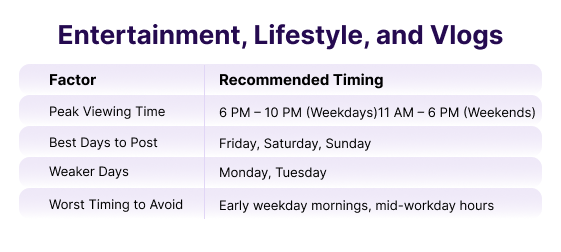
Why this works:
These videos rely on mood and free time, which is why evenings and weekends consistently perform better.
Business, Podcasts, and Professional Content
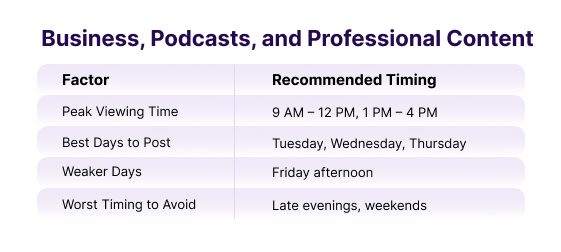
Why this works:
Professional audiences consume content during structured hours and often listen or watch while working or multitasking.
How to Identify Your Best YouTube Upload Time Using Analytics
General posting advice is useful, but it will never be as accurate as data from your own audience. Every YouTube channel attracts different viewers with different habits. That’s why the most successful creators rely on testing and analytics instead of guessing.
This section explains how to read your data correctly and turn it into a reliable posting schedule.
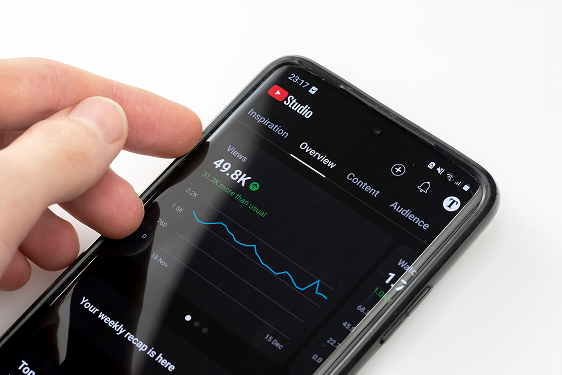
Using YouTube Studio Audience Insights
YouTube Studio is one of the most powerful tools that beginners often ignore. Inside the Audience tab, YouTube shows when people who watch your channel are actually online.
This data is based on real viewer behavior, not estimates. It tells you:
- On which days is your audience most active
- Which hours are they watching videos
- Whether your audience follows a routine
When you upload close to these active periods, your video is more likely to get early views and engagement. That early response helps YouTube decide whether to recommend the video to more people.
Reading Viewer Activity Heatmaps the Right Way
The viewer activity chart uses colors to show activity levels. Darker areas mean more viewers are online, while lighter areas mean fewer viewers.
Many beginners make one mistake here:
They upload at the darkest hour instead of before it.
A smarter approach is to publish 1–2 hours before peak activity. This gives YouTube time to process your video, test it with early viewers, and place it in feeds when most people come online.
Over time, you’ll notice patterns like:
- Certain days are always darker
- Evening or morning peaks
- Consistent viewing habits
These patterns are far more valuable than generic advice from other blogs
How Long You Should Test Before Making Changes
One of the biggest mistakes creators make is changing schedules too quickly. Posting at a new time once or twice does not give enough data to judge performance.
A good testing rule:
- Stick to one upload time for at least 3–4 weeks
- Upload the same type of content during this test
- Compare results fairly, not emotionally
This allows YouTube to understand your consistency and gives you enough data to spot real trends instead of random spikes.
Once you see stable results, you can make small adjustments instead of big changes. This leads to steady growth rather than confusion.
Posting Frequency and Consistency
One of the biggest questions new creators ask is how often they should upload. While posting more can seem like the fastest way to grow, consistency and quality matter far more than volume, especially at the beginning.
How Often New Creators Should Upload
For most beginners, uploading one to two videos per week is a smart and realistic goal. This gives you enough time to plan, film, edit, and improve without feeling rushed or burned out.
Uploading too often can hurt quality, and low-quality videos usually lead to lower watch time and engagement. Growth comes from steady improvement, not constant posting.
A consistent weekly schedule also helps YouTube understand your channel and makes it easier for viewers to know when to expect new content.
Why Consistency Beats Daily Posting
Many new creators try daily uploads and quickly feel overwhelmed. When quality drops, viewers notice, and so does YouTube.
Consistency helps because:
- Viewers build a habit around your content
- YouTube learns when to expect your uploads
- Each video has time to perform without being replaced too quickly
Even if you upload once a week, doing it at the same time builds trust. Over time, this steady rhythm helps you identify the best time to upload on YouTube for your audience and content style.
Measuring Whether Your Timing Is Working
Posting at the right time only helps if it actually improves results. That’s why measuring performance is just as important as choosing when to upload. Instead of guessing, creators should rely on data to see what’s working and what needs improvement.
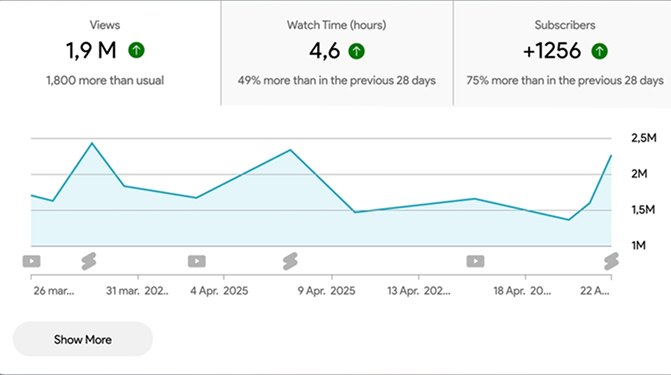
Key Metrics to Track
To understand if your timing strategy is effective, focus on a few core metrics inside YouTube Studio:
- Views: Shows how many people watched your video, especially in the first 24–48 hours
- Click-through rate (CTR): Tells you how often people clicked your video after seeing it
- Watch time: Shows how long viewers stayed on the video
- Early engagement: Likes, comments, and shares soon after publishing
Early performance matters the most. If these numbers improve after changing your upload time, it’s a strong sign that your timing is helping.
Common Upload Timing Mistakes to Avoid
Many creators struggle on YouTube not because their content is bad, but because small timing mistakes hold their videos back. Avoiding these errors can improve reach and engagement without changing the content itself.
1. Posting Randomly Without a Plan
Uploading whenever a video is ready may feel convenient, but random posting makes it harder for both viewers and YouTube to understand your channel. When there is no pattern, viewers don’t know when to check for new content, and YouTube can’t learn when to recommend your videos.
2. Changing Upload Times Too Frequently
Some creators panic after one video underperforms and immediately change their posting time. This creates inconsistent data and makes it difficult to understand what actually works.
YouTube needs multiple uploads to recognize patterns. Changing your schedule too often resets that learning process and slows growth instead of improving it.
3. Uploading Too Late at Night
Late-night uploads often struggle because fewer viewers are online, and early engagement stays low. When a video doesn’t perform well in the first few hours, YouTube may stop pushing it before most people even see it.
4. Ignoring Analytics Data Completely
One of the biggest mistakes beginners make is not checking analytics at all. YouTube provides detailed data for free, yet many creators rely on guesswork or advice from others instead of their own numbers.
Analytics show:
- When viewers are active
- How videos perform early
- Which changes actually improve results
Creators who ignore this data often repeat the same mistakes and miss easy growth opportunities.
How Professional Creators Plan and Scale Content
Growing a YouTube channel is not just about uploading videos. It’s about building systems that let you create, plan, and measure content consistently and efficiently. Top creators don’t work by guesswork. They work with structured workflows, organized calendars, and tools that help them make smart decisions without burning out.
When creators reach a point where they manage multiple platforms, audiences, and team members, they often adopt tools designed to simplify all of these moving parts.
Platforms that integrate content planning, scheduling, publishing, and performance tracking in one place help creators stay organized without switching between apps or spreadsheets. They make it easier to:
- Plan content weeks or months in advance
- Schedule posts to go live at ideal times
- Monitor performance and adjust strategy over time
- Track audience behavior and engagement from one dashboard
This kind of system lets creators focus on what matters the most by making great content, not getting lost in logistics.
Conclusion
Understanding when to publish content plays a major role in long-term YouTube growth. Posting at the right time helps videos gain early visibility, but real success comes from testing, tracking results, and refining decisions based on audience behavior. As channels grow, creators often rely on structured workflows instead of guesswork, using platforms like Practina to plan content, schedule posts, and review performance in one place. By combining timing insights with organized planning, creators can stay consistent, make smarter decisions, and turn small improvements into steady growth.
FAQs
Q: Does Upload Timing Really Matter on YouTube?
A: Yes, timing affects early views and engagement, which helps YouTube decide whether to recommend your video to more people.
Q: Can Good Content Perform Well Even If Timing Is Not Perfect?
A: Good content matters most, but poor timing can reduce early visibility and slow down overall performance.
Q: How Long Should I Test One Upload Schedule?
A: Test the same schedule for at least three to four weeks to collect enough data before making changes.
Q: What Should New Channels Do Without Analytics Data?
A: Start with general posting guidelines and stay consistent until your audience data becomes available.
Q: When Does Educational or B2b Content Usually Perform Best
A: It often performs better during working hours or early evenings when professional audiences are active.
Q: What Metrics Should Businesses Track to Judge Timing Success?
A: Watch time, engagement rate, click-through rate, and audience retention matter more than views alone.