

If you’re wondering why and how to go live on TikTok, you’re right where you need to be!
As of early 2026, TikTok has approximately 170 to 183 million monthly active users in the United States alone. That number says enough. Your audience is there.
No matter what you sell, who you’re targeting, or how niche your category is, a meaningful segment of your audience is already spending time on TikTok.
You probably already have a TikTok strategy in place. You’re posting content, testing trends, maybe even running ads. But there’s one part most brands still don’t lean into enough. Going LIVE.
TikTok LIVE is where things stop being perfectly curated and start feeling real. It is where your audience connects with you beyond the content. And that shift changes how people perceive your brand.
Whether you’re a solo business owner or part of a larger team, showing up LIVE is one of the simplest ways to build connection, trust, and recall.
And the best part? It’s easier than you think.
Why You’ll Love This Blog
In this blog, we are not just covering how to go LIVE on TikTok.
We are also getting into:
- What TikTok LIVE actually is
- How many followers you need to go LIVE
- A workaround if you do not meet the requirement
- A step-by-step guide to get started
- What to do on TikTok LIVE to keep people watching
- How to get more viewers on TikTok LIVE
- Practical TikTok LIVE ideas you can start using immediately
Because going LIVE is not just about showing up. It is about making it count.
What Is TikTok LIVE?
TikTok LIVE is exactly what it sounds like. A real-time video broadcast where you interact with your audience as things happen.
But the experience goes beyond just video.
While you are LIVE:
- Viewers can comment in real time
- You can respond instantly
- People can send reactions and virtual gifts
- You can invite guests to join your LIVE
- You can build conversations instead of just views
Think of it like this.
Your regular TikTok content is your storefront. Clean, curated, designed.
Your LIVE is what happens inside the store.
For example:
- Sephora often uses LIVE sessions for product demos and tutorials, answering questions as they come in.
- Gymshark goes LIVE during launches, workouts, and community events.
- Duolingo uses LIVE in a more playful way, leaning into its brand personality to keep people engaged.
It is raw, interactive, and far more personal than a posted video.
Why Going LIVE on TikTok Is Worth It
Going LIVE plays a very different role compared to regular content. It is less about reach and more about depth.
Here’s what it does for you:
- Builds real connection
People see how you think, speak, and respond. That builds familiarity fast. - Creates instant interaction
Questions get answered on the spot. No waiting, no friction. - Holds attention longer
A 15-second video is quick. A 20-minute LIVE session is actual engagement. - Builds trust faster
When people see you in real time, it feels more authentic and credible.
Brands like Nike and Fenty Beauty use LIVE not just to promote, but to explain, demonstrate, and connect in a way that feels natural.
Prerequisites: How Many Followers Do You Need to Go LIVE on TikTok?
Before you go LIVE, there are a few requirements.
The basic criteria:
- You need at least 1,000 followers
- You must be 16 years or older to go LIVE
- You must be 18+ to receive gifts
Why does TikTok have this rule?
It is not random.
- Quality control: LIVE content is harder to moderate
- Audience readiness: With 1,000 followers, you are likely to have some engagement already
- Platform safety: Reduces misuse and spam
So if you are wondering how many followers on TikTok to go LIVE, this is your benchmark.
How to Go LIVE on TikTok Without 1,000 Followers
If you are just starting out, this can feel limiting. But there is a workaround.
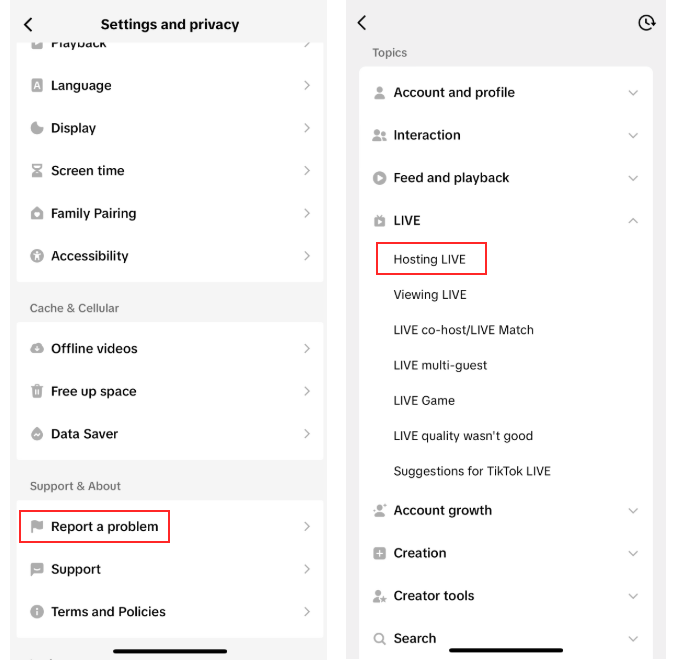
Request LIVE access through TikTok support
Go to:
Settings → Report a Problem → LIVE → “I can’t start a LIVE”
Then submit a request.
Example message you can send:
“Hi TikTok team, I am unable to access the LIVE feature on my account. I create consistent content and would like to engage more with my audience through LIVE sessions. Could you please enable LIVE access for my account?”
Does it work?
Sometimes yes. Sometimes no. There is no guarantee. But enough users have seen success for it to be worth trying.
A Smarter Way to Grow Into Live Faster
If you are building from scratch and struggling with consistency, that is usually the real bottleneck.
This is where something like Practina helps.
Instead of trying to manage everything manually:
- Your content gets created and scheduled
- Your presence stays active
- Your audience builds over time
Which means hitting that 1,000 follower mark becomes a lot more achievable without burning out.
Step-by-Step: How to Go LIVE on TikTok
Let’s break this down properly. You open TikTok. You are ready. Now what?
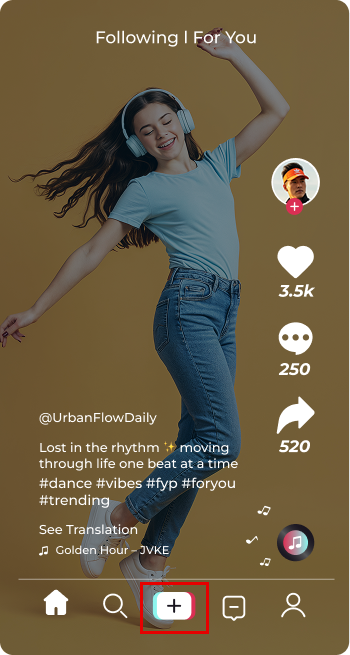
Step 1: Tap the “+” button
Same place where you create a post.
Step 2: Swipe to “LIVE”
You will see it next to the regular video options.
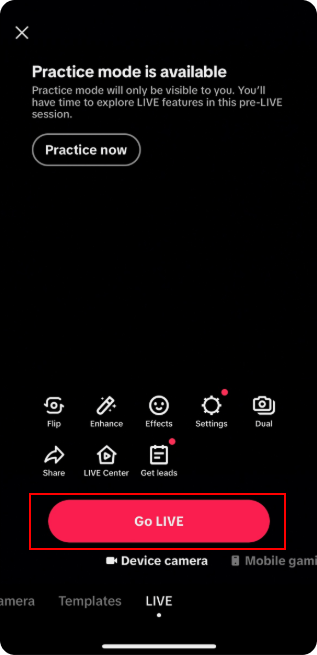
Step 3: Add a title
Keep it clear and interesting.
Bad: “Going LIVE”
Better: “Quick Q&A on skincare routines” or “Behind the scenes of today’s shoot”
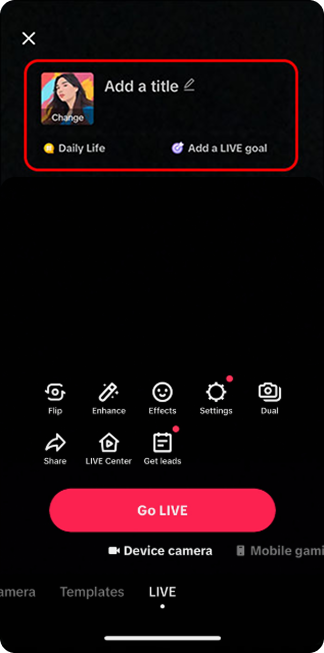
Step 4: Add filters or effects (optional)
Keep it natural. Do not overdo it.
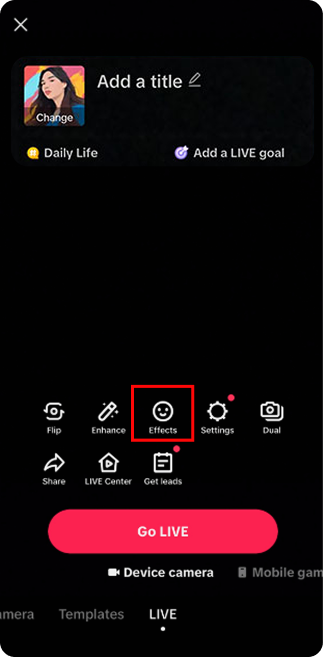
Step 5: Tap “Go LIVE”
And you are in.
Now here is where most people freeze.
Because going LIVE is easy. Staying engaging is not.
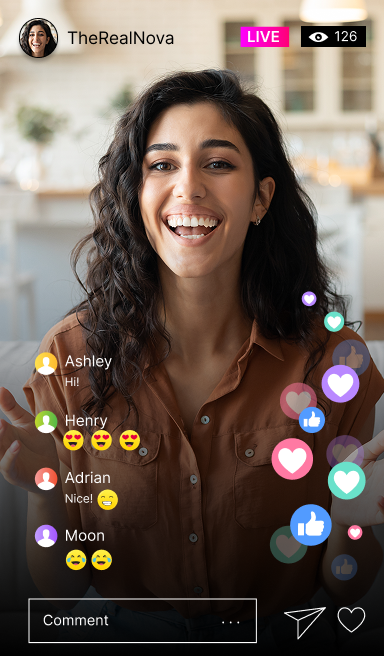
Before You Go LIVE on TikTok, Do This
Going TikTok LIVE can do a lot for your brand. But you need a bit of structure.
Yes, it is candid.
But you cannot just show up blank.
You do not want to go LIVE and feel awkward or unsure of what to say.
Here are a few things that actually work.
7 Ways to Make Your TikTok LIVE Sessions Engaging
1. Always start with a proper introduction
Do not assume people know you.
“Hey guys, welcome in. If you are new here, I’m [Name], and today we’re talking about…”
You can even create a signature opening line. It sets the tone and makes repeat viewers feel familiar.
2. Keep repeating context
People join at different times. Every few minutes, reset:
“For everyone just joining, we’re talking about…”
This keeps new viewers engaged instead of confused.
3. Make it interactive from the start
Ask simple questions:
“Where are you joining from?”
“Have you tried this before?”
The more people type, the more your LIVE gets pushed.
4. Call out viewers by name
“Hey Dave, great question.”
“Calvin, that’s a good point.”
It feels personal. It keeps people around longer.
5. Talk around your brand, not just about it
Do not turn it into a pitch.
If you sell coffee:
- Talk about morning routines
- Talk about favorite brews
- Share stories
Your brand fits into the conversation. It should not dominate it.
6. Make it feel like a story, not a script
Have talking points, not lines. Let it flow. Pause. React. Laugh if needed.
That is what makes LIVE different from content.
7. Choose timing strategically
Test different slots.
Evenings and late nights often work better. But your audience might behave differently. Watch patterns. Adjust.
What Not to Do on TikTok LIVE
- Do not sit silently waiting for people to join
- Do not ignore comments
- Do not over-sell
- Do not drag the session without direction
- Do not go LIVE without a purpose
If you are asking what to do on TikTok LIVE, this list matters just as much as the “do’s”.
TikTok LIVE Restrictions You Should Know
TikTok does not show your LIVE to everyone equally.
Restrictions can happen if:
- Your content violates guidelines
- You use restricted words
- Your account has prior violations
- Certain regions or age groups are filtered
So if your reach feels low, it is not always random.
Want to Build a Strong TikTok Presence Without the Chaos?
Showing up consistently is the hard part. Not ideas. Not strategy. Just consistency.
With Practina:
- AI creates and posts content for you
- Gallery AI turns your visuals into ready-to-use posts
- Your TikTok stays active without daily effort
Which means:
- You grow faster
- You stay visible
- And going LIVE actually becomes worth it
Because now you have an audience waiting.
Conclusion
Going LIVE on TikTok is not complicated. But doing it right makes all the difference. It is one of the fastest ways to:
- Build trust
- Connect with your audience
- Turn viewers into customers
So if you have been holding back, start simple. Go LIVE. Talk. Engage. Learn. Then do it again, better.
FAQs
Q: How to go LIVE on TikTok?
A: Tap the “+” button, switch to LIVE, add a title, and start broadcasting.
Q: How many followers on TikTok to go LIVE?
A: You need at least 1,000 followers to access the LIVE feature.
Q: What to do on TikTok LIVE?
A: You can host Q&As, demos, behind-the-scenes sessions, or just talk to your audience in real time.
Q: How to get more viewers on TikTok LIVE?
A: Engage early, ask questions, respond to comments, and keep your session interactive.
Q: What are some TikTok LIVE ideas?
A:
- Product demos
- Live tutorials
- Q&A sessions
- Behind-the-scenes
- Daily conversations around your niche
More Marketing Tips & Insights
TikTok Secret Emojis: Full List of Hidden Tiktok Emojis & Codes