

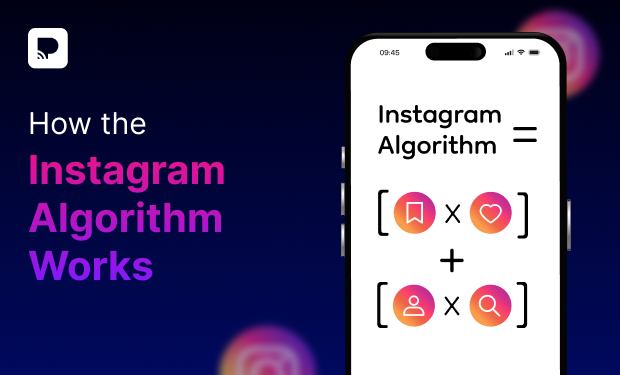
Right now, the Instagram algorithm can make or break a creator. It decides whether your content goes viral or barely gets seen. But here’s the truth: the algorithm doesn’t decide on its own.
Your AUDIENCE does!
What people watch, save, share, and ignore directly shapes how your content performs across different segments.
To make this clearer, let’s break it down
What is the Instagram Algorithm
The Instagram Algorithm isn’t just one thing. It is usually powered by multiple algorithms and ranking systems to optimize user content across surfaces such as Feed, Stories, Explore, and Reels. Generally, it shows people what and when they want to see. Moreover, these algorithms help people find what they care about easily. They don’t typically need to search for something. But the Instagram Algorithm works for them.
How Does Instagram Work?
Instagram works as a prediction system. It constantly estimates how likely a user is to engage with a post. Thus, no two people see the same Instagram.
In simple terms, the content is ranked individually, not universally. Every post is tested with a small audience first, and its performance determines whether it reaches more people. Moreover, the watch time plays a major role, especially for Reels, where completion and replays are crucial.
In addition to this, early engagement, usually the first 30–60 minutes, can significantly boost reach. Also, long-term success depends on consistency and a clear, niche-focused content strategy.
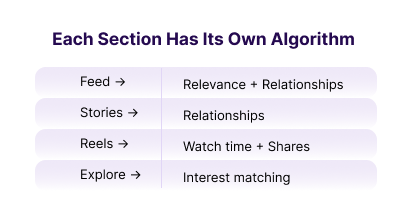
Each Section Has Its Own Algorithm
Although if you’re searching, how long can Instagram videos be, the answer is:
- 3 minutes for reels
- 60 seconds for stories
- 60 minutes for in-feed posts
- 4 hours for live broadcast
How Instagram Feed Works
The Feed algorithm decides which posts from accounts you already follow appear, at the top, in the middle, or barely at all.
Step 1: You post on the feed
Instagram does not show it to all your followers immediately. Rather, it first shows the post to a small group of followers.
Step 2: Instagram measures early behavior
Instagram watches how that test group reacts and tracks these signals:
- Did they stop scrolling?
- Did they like or comment?
- Did they save the post?
- Did they share it?
- Did they spend time reading the caption?
- Did they tap your profile?
Step 3: Relationship strength evaluation
For each viewer, Instagram checks:
- Have they liked your posts before?
- Have they commented or DM’d you?
- Have they visited your profile?
- Do they often interact with similar content?
Step 4: Ranking happens per person
Instagram then ranks your post individually for every follower. Therefore,
- Person A may see your post at the top
- Person B may never see it
- Person C may see it hours later
Step 5: Distribution expands or slows
If early engagement is strong, your post is shown to more followers. In a like manner, it stays in feeds longer (hours or days). Whereas, if engagement is weak, the distribution slows, and the post sinks quickly
How Instagram Stories Works
Instagram Stories are not about reach or virality. They are about building relationships and daily interaction.
Step 1: You post a Story
Instagram does not show your story in the same order for everyone. Instead, it ranks your story individually for each viewer.
Step 2: Instagram checks relationship strength
For every person who follows you, Instagram evaluates:
- Have they replied to your stories before?
- Do they send you DMs?
- Do they react with emojis?
- Do they vote in your polls?
- Do they watch your stories fully or skip them?
Step 3: Predicts the likelihood of interaction
It predicts – Will this person tap your story? Will they reply or react? Will they watch till the end? Will they DM after watching?
Step 4: Completion rate matters
Instagram tracks:
- Do people watch all your story slides?
- Or do they tap away midway?
Step 5: Engagement actions boost future visibility
Actions that strongly boost story ranking are story replies, emoji reactions, polls, quizzes, sliders, and link clicks.
How Instagram Explore Works
Explore functions as Instagram’s content discovery system. It recommends posts from non-followed accounts based on user behavior. It can change the game equally, because:
- Small accounts can beat big accounts
- One post can bring massive new reach
- Interests matter here
Step 1: User interest profiling
Instagram builds an interest profile for every user based on the posts they like, save, share, and fully consume.
Step 2: Content categorization
When you post, Instagram analyzes your content. As a result, it helps Instagram understand what your post is about.
Step 3: Initial testing
Instagram shows your post to a small group of non-followers who like similar content. It measures likes, saves, shares, comments, and the time people have spent on the platform.
Step 4: Engagement comparison
Your post is compared against similar posts. Instagram asks: “Is this post performing better than average for this topic?”
If yes → Congrats! It’s a wider distribution
If no → The distribution stops
Step 5: Scaling or stopping
When the performance stays strong, the post is shown to larger interest clusters. It stays on Explore longer as well. On the other hand, if engagement drops, the reach slows down.
How Instagram Reels Works
Reels are Instagram’s main discovery + growth engine. The goal of the Reels algorithm is to show short videos that people will watch all the way through and rewatch. Unlike Feed or Stories, Reels are interest-based, not relationship-based.
Step 1: Content understanding
When you upload a Reel, Instagram first figures out what your Reel is about, using video analysis (objects, motion, faces), captions, keywords, hashtags, audio, and on-screen text.
Step 2: Initial testing (small audience)
Your Reel is first shown to a small group of users, mostly non-followers or people who interact with similar Reels.
Step 3: Key performance signals (The most important part)
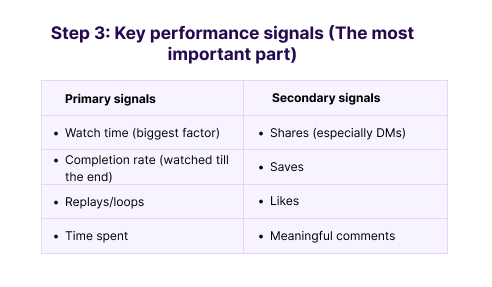
Additionally, a Reel with fewer likes but high watch time can outperform one with many likes.
Step 4: Benchmark comparison
Instagram compares your Reel to other Reels in the same category. It asks: “Is this Reel keeping people watching longer than average?”
If yes → it scales
If no → reach slows or stops
Step 5: Scaling distribution
If performance is strong, Reel is shown to larger audiences. It appears in:
- Rle users)
Step 6: What reduces Reel reach
Instagram limits Reels that:
- Have watermarks (TikTok, CapCut)
- Are low resolution or blurry
- Use engagement bait
- Are misleading or clickbait
- Are reposted or unoriginal
- Violate guidelines
How Instagram Search Works
Instagram Search helps users find specific content, accounts, or topics. The major goal of the search feature is to show the most relevant and trustworthy results.
Step 1: User intent detection
When a user types in the search bar, Instagram tries to understand through two aspects:
- What exactly are they looking for?
- Is it a person, a brand, a hashtag, a place, or a topic?
Step 2: Keyword matching (Very important)
Instagram scans:
- Usernames
- Display names
- Bios
- Captions
- Hashtags
- Alt text
- On-screen text in videos
Step 3: Ranking the results
Instagram ranks results based on relevance + quality.
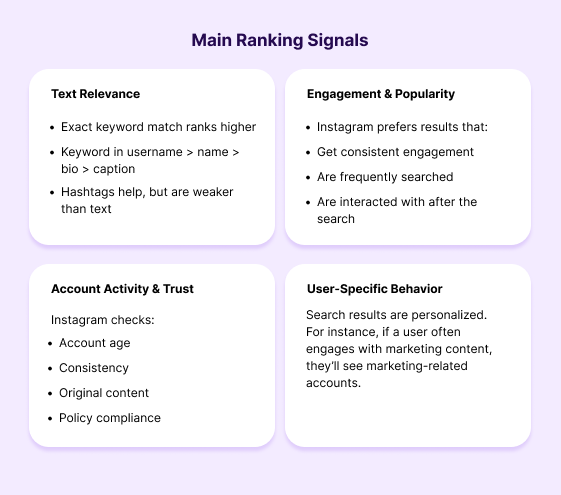
Main Ranking Signals
Step 4: Content filtering
Instagram deprioritizes content with:
- Low-quality
- Clickbait
- Misinformation
- Keyword stuffing
- Policy-violating content
Instagram Algorithm for 2026
1. User Control & Personalization Increases
Instagram is rolling out a new feature called “Your Algorithm”. It lets users see and adjust the topics the algorithm thinks they care about — starting with Reels and likely expanding to Explore and other areas of the app. Therefore, giving people more direct control over what content they see.
2. Meaningful Engagement Beats Vanity Metrics
The algorithm increasingly favors deep interaction:
- Shares and DMs over likes
- Saves and collections over quick reactions
- Comments with substance (longer, conversational)
3. AI & Intent-Based Discovery
Instagram’s recommendation engine is becoming more AI-driven and context-aware. For this reason, content is now categorized and suggested based on nuanced semantic and behavioral signals. Not just hashtags or broad topics, it is effectively working like a mix of search + AI prediction.
4. Micro-Niche & Topic Consistency
The algorithm groups content into hyper-specific topic clusters. For instance, “morning yoga routines” vs simply “fitness”. Posting within a clear niche consistently helps Instagram place your content with the right audience. On the other hand, inconsistency can reduce distribution.
5. Keyword & Caption Optimization Over Hashtags
Instagram’s discovery signals have shifted toward keyword usage. Words in captions, alt text, and profiles, by and large, play a bigger role than hashtags for search.
6. Resetting Algorithm History
A new “Reset Suggested Content” feature lets users clear their recommendation history and start fresh. Meaning thereby, engagement habits may need to be retrained if users reset their preferences.
7. Integrated Discovery Outside Instagram
Instagram begun integrating public posts into Google search results. Subsequently, your content can be discovered outside the app if optimized well, serving SEO-like value to social media content.
Conclusion
Understanding the Instagram algorithm is one thing; applying it effectively is another. As the Instagram Creators account points out, authenticity and transparency are essential for building sustainable engagement. Short-term tactics may bring quick wins, but they don’t drive long-term growth.
Therefore, focus on creating content that genuinely engages your audience and keeps your community coming back. To simplify the process, sign up for Practina.
FAQs
Q: What Are the Best Times To Post on Instagram?
A: Generally, early mornings (7–9 AM) and evenings (6–9 PM) work best when users are most active. Test and adjust based on your audience insights.
Q: What Are the Best Days To Post on Instagram?
A: Tuesday to Thursday typically see higher engagement, while Sundays often perform the weakest.
Q: Can You Schedule Instagram Posts?
A: Yes. You can schedule posts using Meta Business Suite or third-party tools like Buffer, Hootsuite, or Later.
Q: How Long Can Instagram Videos Be?
A: Reels can be up to 90 seconds, Feed videos up to 10 minutes (or 60 minutes for larger accounts), and Stories are 15 seconds per slide.
Q: How To Analyze the Instagram Grid?
A: Review visual consistency, content mix, and performance of recent posts to ensure your grid tells a clear, cohesive brand story.